4 min read
Framer 3.0 — AI Done Well
While everyone was dumping AI features into their products, Framer took their time… and it was worth it.
 Adam Bárta

Framer just had their 3.0 event, and a lot was announced. I haven’t had hands-on time with everything yet, so these are first impressions and announcements from the event, not a full review.
With 3.0, there’s more than enough here to talk about.
The headline topics:
- AI agent that works directly on the canvas
- Branching that improves how heavy production work is done
- External agents like Codex and Claude Code connecting into your projects
- Reworked community with a marketplace, gallery, feed, and contests
That’s a lot for one release, so let me sum up the most important parts.
All images have been sourced from Framer.

The AI canvas
The core idea behind 3.0 is simple: the canvas beats code for design work.
Framer’s new AI agent doesn’t pull you into a terminal or a separate chat interface.
It works where designers already work — on the canvas. Select a layer, reference it in your prompt, and point to design tokens, components, or other pages
It also responds with realtime visual feedback. Not batch updates you wait on.
The agent has access to most parts of Framer. It covers design, animations, CMS content, SEO, site settings, analytics, and more.
You can also choose which AI model powers the agent, depending on which you prefer and how many credits you want to spend.

Credits will cost you
Framer also introduced a credit system for its AI features. Every plan now includes monthly credits for agents, with Basic getting 1,000 credits and Pro getting 3,000.
The exact cost per task is still not very transparent, especially for more complex agent work. In addition, external agents are free but only during preview.
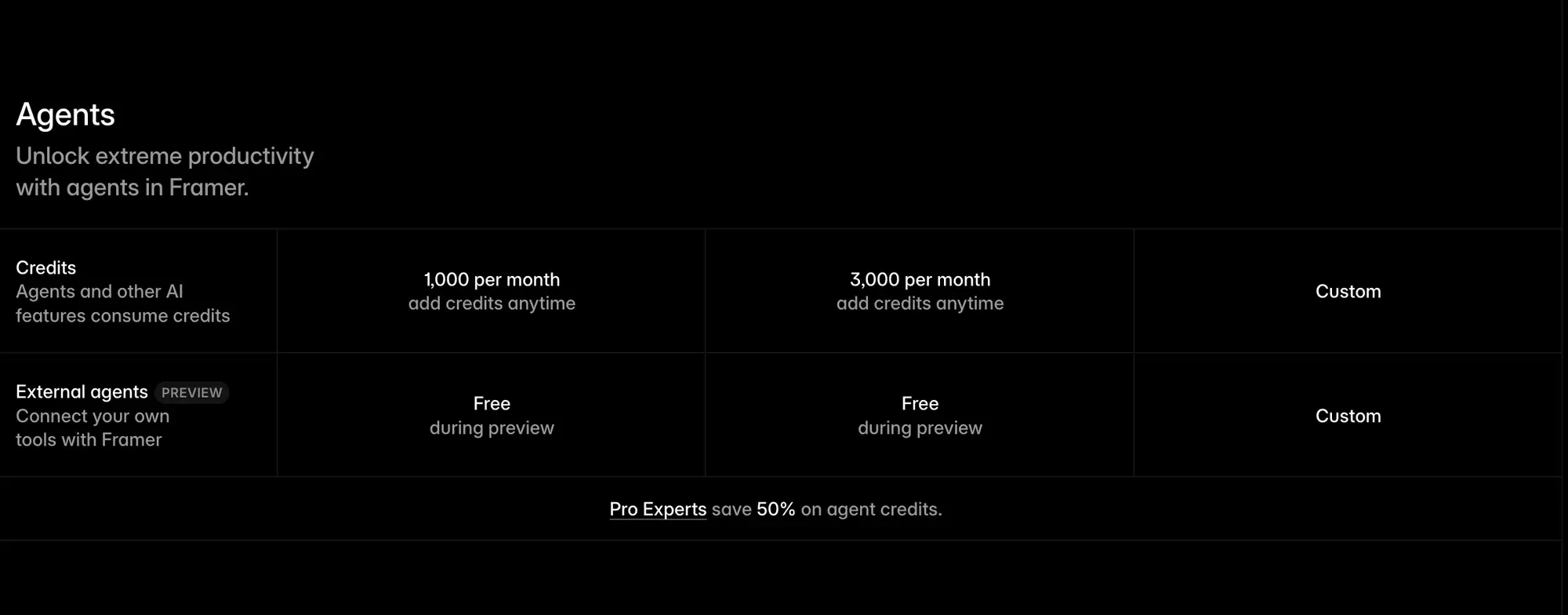
On the positive note, if you are a Framer Pro Expert, you get 50% off on all agent credits!
My favorite new AI use cases
There is a thin line between a gimmick and actually useful AI. So here are my favorite use cases I found so far.
1. Animation work
Staggered effects and complex animations are exactly the kind of tedious, repetitive work that eats time. The agent can now do that for us.
2. Components and tokens
Agent can go into a component and generate responsive variants for them. This is great for simple but annoying things like navbars and footers.
It can also turn repeated elements into components automatically, and apply consistent text and color tokens across a full project. Ideal for cleaning up the project before its release.
3. Auditing
For anything pre-launch, the auditing capabilities matter too. Pre-release checks are the most boring but necessary parts of any project.
The agent can now check copy, review SEO, accessibility, and other details before you release. Lifting that work off your shoulder.
4. CMS work
Manually filling dozens of CMS rows is another task I hate doing. Since the agent works in CMS natively, it can take that burden away as well.
Have it extract existing content, come up with new CMS structures, or just fill one you already have in place.
5. Exploration
The AI agent can also work in your Design pages. That way, you can easily explore different variants for your designs or have the agent extract your design system so your team can review it in one place.

External agents — yay!
We all hate being locked into ecosystems. Luckily, Framer lets us plug in our own agents.
They authorize in, work in real-time, and can even operate across multiple projects at once.
This opens up things like merging projects, migrating content between tools, pulling in connected files and apps, and building CMS structures from local content.
You can also extract copy, styles, and design notes into a markdown file, or run a site audit and push the results somewhere like Notion.
Where Figma is going in the opposite way, trying to lock designers into their new agent solution, Framer is keeping it open. Glad to see that.

Branching — it's like git for designers
Branching was a long-requested feature, and it's finally here.
It shows who created each branch, lets other collaborators join, and generates previews you can share. Agents can also create branches automatically as they work.
For redesigns, experiments, and large production websites, this feature is a goldmine.
The big picture
Framer took its time with adding AI into their product, but they seem to have done it right.
Not because of any one thing in it, but because of how they have approached this whole concept.
The approach counts on you being involved in the design process. Not generating websites from scratch and stealing the creative work from you.
I haven’t taken this into a project yet. First impressions from an event are always more optimistic than everyday use. But the direction is right, and the specifics are done better than I expected.
Will you use AI in Framer, or will you stay away?